To check an AI YouTube summary, select the claims you plan to use, open their source moments, and compare the wording with what the speaker says. Verify names, numbers, qualifications, and who made each claim. Then decide whether you also need an independent source. A summary can accurately repeat a speaker who is mistaken.
That distinction separates two checks: fidelity to the video and truth beyond the video. A timestamp helps with the first. It does not settle the second. This guide explains how to review a summary from KnowledgePilot or another video tool without mistaking a confident paragraph for evidence. When you use an AI YouTube video summarizer to extract key points, judge the result by what it preserves from the recording.
YouTube summaries should help you find relevant video content while keeping uncertainty, attribution and source context visible.
What does an accurate video summary need to preserve?
An accurate summary preserves the meaning of the source while shortening it. It should keep material qualifications, attribute opinions to the right person, and avoid presenting an example or prediction as an established result. It can leave out repetition. It should not leave out an exception that changes the claim.
Imagine a speaker says, “This method may help small teams, provided their data is already clean.” A summary that says “This method improves team performance” has removed uncertainty and a condition. This is a hypothetical editing example, not a quotation from a real video. The review question is concrete: did shortening the sentence change what the audience could reasonably conclude?
Check the transcript before blaming the summary
A summary can inherit an error from the transcript. YouTube’s automatic-caption guidance says speech recognition may misrepresent spoken content because of pronunciation, accents, dialects, or background noise. If a name, technical term, or number looks wrong, listen to the audio rather than comparing two pieces of text that might share the same transcription mistake.
For captioned videos, YouTube’s transcript instructions explain how to open the transcript and jump to a passage by selecting a caption line. That gives you a way to investigate even when your summarizer provides no clickable references. Search the YouTube video transcript for a distinctive name or phrase, then listen to that passage. If the audio is ambiguous, record the uncertainty. Do not silently replace it with a plausible guess.
Audit the claims you intend to reuse
Start with the sentences you would put in a report, study note, or presentation. Prioritize names, dates, quantities, comparisons, and anything that changes a decision. For each sentence, record the summary’s claim, the source moment, what you heard, and whether the wording needs a correction. This is a claim-by-claim review, not a numerical accuracy benchmark. Content creators should apply the same check before turning a YouTube video summary into a script, newsletter or social post.
Keep a speaker’s exact quotation separate from your paraphrase and interpretation; a summary is not a substitute for checking the words you plan to quote.
Use plain outcomes: “supported by the passage,” “needs qualification,” “wrong speaker,” or “not found.” If a claim is not found, ask the tool to identify the supporting passage or remove the claim from your working notes. Do not turn a few successful spot checks into “the whole summary is accurate.” You have verified the claims you inspected.
Follow timestamps and inspect the surrounding context
Open a cited moment and listen beyond the quoted phrase. The qualification may come immediately afterward; a correction may appear later in the conversation. Check that the reference supports the actual sentence, rather than merely mentioning the same topic. If the speaker says “some” and the summary says “all,” the topic match is insufficient. Video length affects how you organize the review, not whether a claim is supported.
For long talks, webinars or interviews, check one topic at a time and look for later corrections. Watch the full video when you need its complete argument or when selected passages leave important context unresolved.
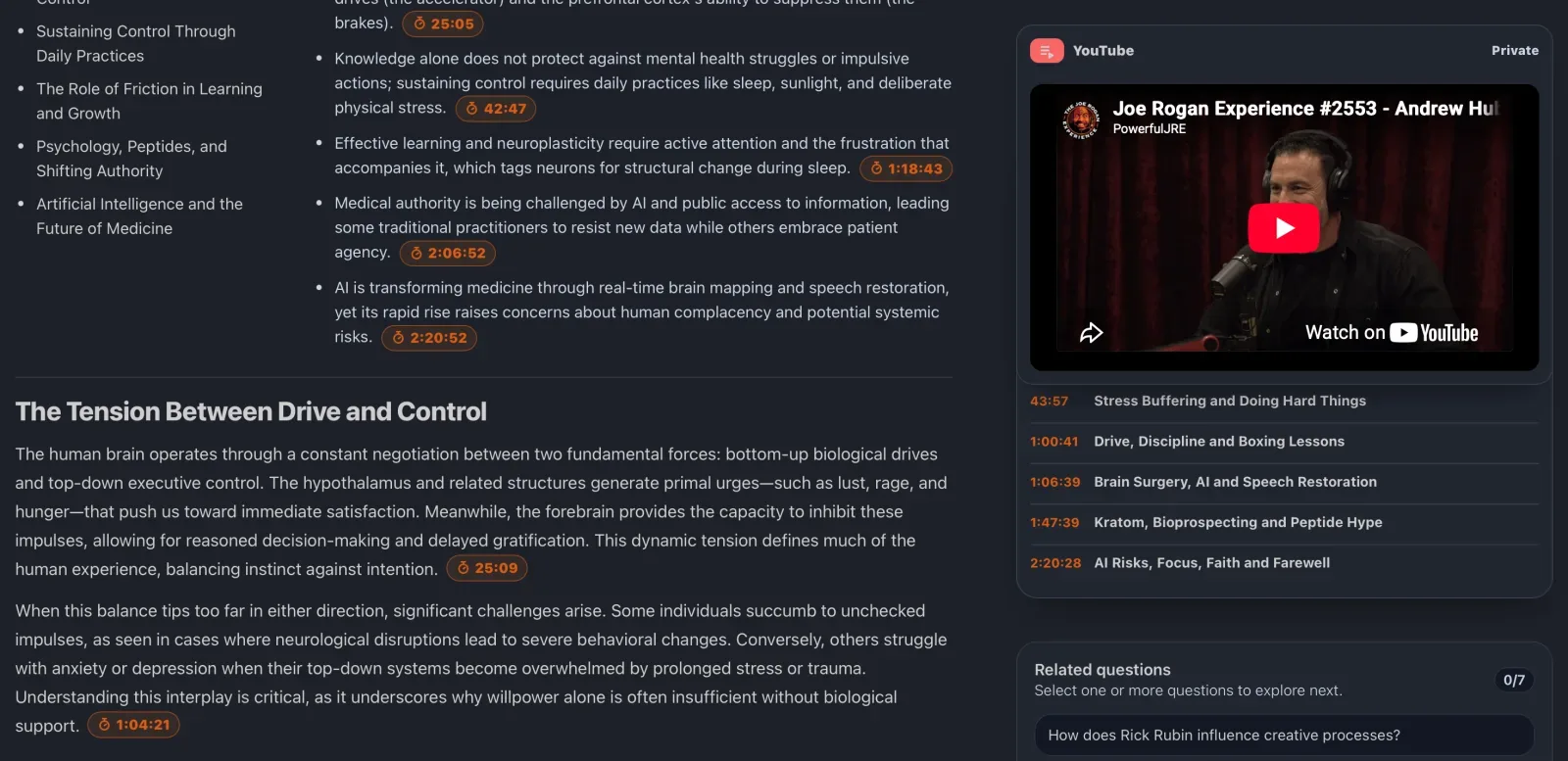
KnowledgePilot’s video-summary walkthrough demonstrates timestamped takeaways and focused answers alongside a YouTube source. Short Summary is citation-free, so use a supported citation-bearing output when you need references to inspect. Treat those references as navigation to evidence. You still need to decide whether the passage supports the wording.
Keep predictions, examples, and measured results distinct
When a summary contains a number, check its unit, timeframe, population, and status. Is it a measured result, an estimate, a forecast, or a speaker’s illustrative figure? “Revenue could reach this level” and “revenue reached this level” describe different things. A chart does not remove that difference.
For illustration, “40% faster” is incomplete without knowing what was measured, compared with what, and under which conditions. Do not supply missing details yourself. If the video cites a study or report, follow that original source before reusing the figure as established evidence. Keep the video as the source for what the speaker said and the report as the source for the underlying result.
Check speaker attribution in interviews and podcasts
An interview may include a host’s question, a guest’s reply, and a second guest’s disagreement. A summary that merges them into one position can misrepresent the conversation even when each phrase appears somewhere in the transcript. Ask who made the claim and whether another speaker challenged it.
A useful follow-up prompt is: “For this claim, identify the speaker and the supporting passage. Explain any qualification or disagreement in the video. Separate what is stated from what is inferred. If the source does not support the claim, say so.” This is a suggested prompt, not a promise that every tool will produce reliable speaker labels. Check the answer against the recording.
Watch visuals when spoken words are insufficient
A transcript may contain “as you can see here” without describing the chart on screen. It may also omit a code change, slide footnote, or handwritten equation. When the claim depends on a visual, watch the segment and inspect the visual yourself. Check axis labels, units, and dates before copying a chart’s apparent conclusion.
This matters even if the spoken summary is faithful. The speaker may leave details on the slide instead of reading them aloud. Add those details to your notes only after reviewing the screen, and identify them as coming from the visual. Avoid assuming that a transcript-based answer has inspected every frame of a video.
Decide when you need independent fact-checking
If your purpose is to describe what a guest argued, faithful attribution may be enough: “The guest argues that…” If your purpose is to claim that the argument is true, inspect the underlying evidence. Look for the original paper, dataset, product documentation, or announcement the speaker cites, and check its date and scope.
If the video gives no identifiable source, say that the claim is attributed to the speaker and has not been independently verified. A second summary of the same video is not an independent source. Agreement between two AI tools can reflect the same input, the same omitted qualification, or the same mistaken claim. If you summarize YouTube videos on the same topic, keep each recording and its claims separate.
Comparing multiple YouTube videos can reveal disagreements, but repeated claims may all trace back to one report. Follow the underlying evidence before treating repetition as confirmation.
Do timestamps make an AI summary accurate?
No. Timestamps make it easier to locate supporting passages. A reference can be misplaced, incomplete, or attached to an interpretation the passage does not support. Use the link to inspect the evidence and adjust your notes when the wording goes beyond it.
Is there a universal accuracy percentage for AI video summaries?
No single percentage describes every tool, source, and task. A meaningful accuracy claim needs a defined evaluation method, a stated set of videos, and criteria for errors and omissions. This article reports a review method, not a comparative tool test or an observed accuracy score.
What should I do if the summary has no source references?
Search the video’s transcript for the claim’s distinctive terms and listen to the matching passage. If you cannot find support, leave the claim out of anything you reuse until you can verify it. For repeated research, choose outputs that keep a route back to the source so the checking step is easier to repeat.
Try the checking method on one video
Use the KnowledgePilot YouTube summarizer to generate an overview and select a citation-bearing output for closer review. Check the claims you plan to reuse and keep corrections beside the saved analysis. If your goal is learning from a lecture, continue with our YouTube lecture to study notes guide and apply the same evidence checks to your definitions and examples.