A report summary says a project reduced operating costs by 18%. There is a citation beside the sentence. Before you reuse the figure, you need to know whether it describes a measured result, a forecast, or one selected trial. A PDF summarizer with citations should make that distinction easier to check.
Explore the KnowledgePilot PDF summarizer with citations
This guide explains what a useful citation looks like, how to ask for a reviewable summary, and how to spot a reference that looks convincing but does not support the answer.
Three kinds of PDF reference, three different jobs
| Reference | What it helps you do | What you still need to check |
|---|---|---|
| Document title | Identify the source | Find the actual passage |
| Page or section | Narrow the search | Identify the sentence, table or footnote |
| Linked passage | Inspect the supporting wording | Read surrounding conditions and exceptions |
Page numbers alone can be confusing. A PDF viewer may count a cover and contents page that the printed report does not. A linked passage is helpful, but even an exact reference cannot make a misinterpreted sentence correct.
Think of a citation as a route back to evidence, not a quality seal. The useful unit is a checkable claim paired with the passage that actually supports it. One reference after a paragraph of unrelated claims is harder to audit than a reference beside each material point.
Ask for a summary with an evidence trail
Try this prompt: “Summarise the document's main findings. For each finding, include the supporting evidence, any stated limitation, and a source reference. Separate the author's claims from your interpretation. Mark unsupported answers as not established.”
Keep the scope manageable. Five findings with clear support are more useful than twenty claims followed by one citation at the end. If your question is about a single policy or technical requirement, ask it directly instead of summarising the whole PDF first.
KnowledgePilot lets you upload a document, choose structured outputs or ask a custom question, and inspect available source citations. The important habit is to open those references while reviewing the answer.
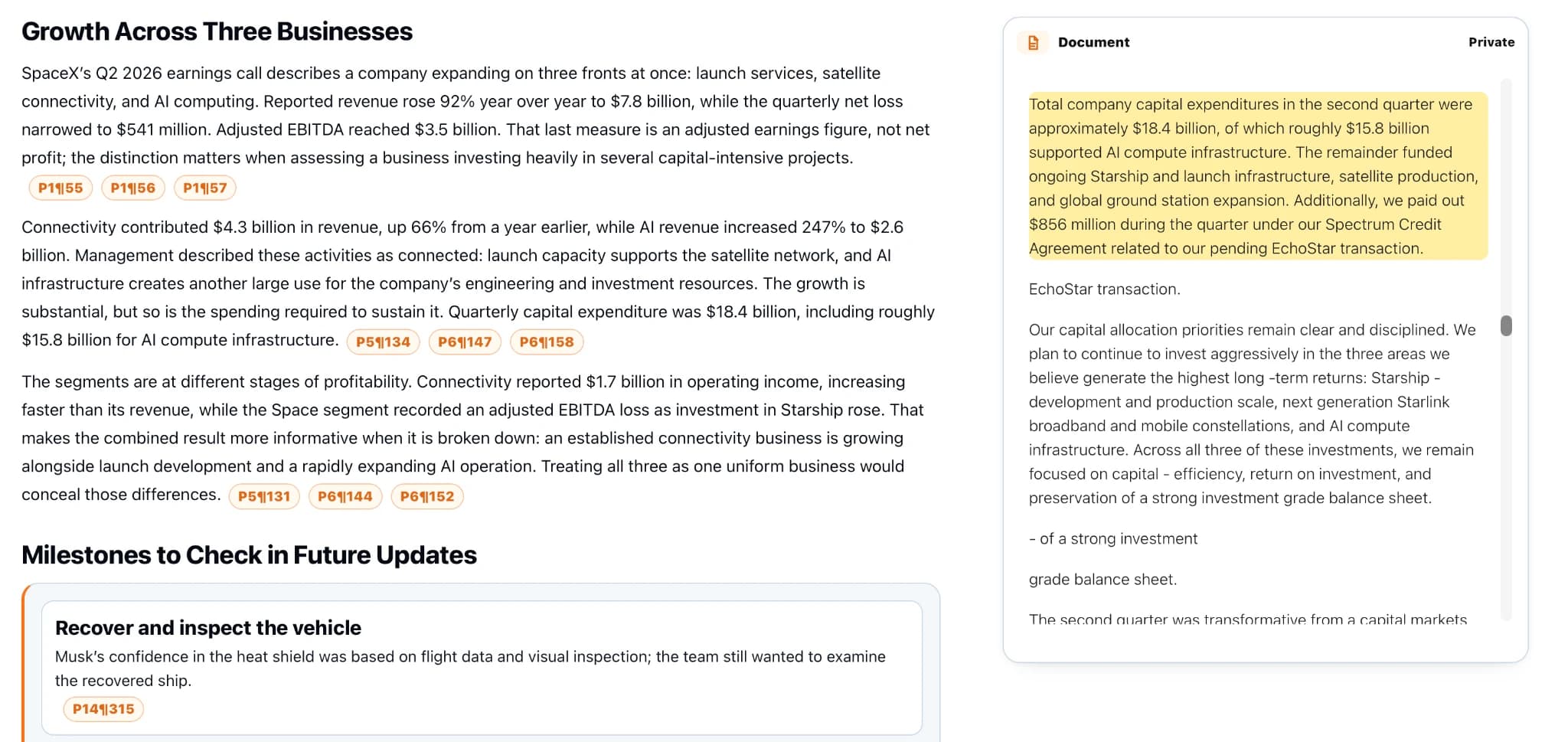
Begin with a clean, readable PDF and verify its title and revision in the source viewer. For a narrow task, use a custom question such as “What does this report establish about the six-week pilot? Preserve units, site and dates, and show the supporting passage.” Save a broad summary only if you also need orientation across the full document.
A worked example: when 18% becomes misleading
Imagine a fictional report says: “In a six-week pilot at Site A, energy use fell by 18%; annual savings have not been established.”
An overcompressed summary might say “The system cuts annual energy costs by 18%.” That changes the measurement, location, period and certainty. A faithful note would preserve “energy use,” “Site A,” and “six-week pilot,” then flag that annual savings remain unknown.
Use four fields for every figure you intend to repeat: value, unit, period and scope. Add whether it is observed or projected. This small amount of structure prevents a surprisingly large amount of cleanup later.
An evidence note for the fictional example might read: “Energy use, −18%; six-week period; Site A pilot; observed in this trial; annual savings not established.” That note is longer than a headline, but it can survive being copied into a brief without changing its meaning. If the PDF's table uses a different unit from the prose, resolve that discrepancy in the original before publishing either number.
Test the citation, not just the answer
- Open the reference and locate the supporting statement.
- Read the sentence before and after it for qualifications.
- Inspect the original table if the answer includes a number.
- Check whether the reference supports the entire claim or only part of it.
- Mark any remaining inference in your own notes.
A paragraph that cites three pages may be combining several ideas. Split it into separate claims so each can be checked. If a reference leads to the right topic but no supporting statement, it has helped navigation without establishing the answer.
When several documents are in a KnowledgePilot Hub, ask for the source title beside each answer. A claim from a prior-year report should not silently become a current-year fact. If the answer merges sources, break it into one question per document and compare the verified passages yourself.
When extraction is the real problem
Scans, two-column papers, tables and footnotes can make text extraction difficult. Warning signs include missing negative signs, headings merged into sentences, and table values detached from their labels.
Inspect a representative page before asking detailed questions. If the text is unreadable or absent, use a clearer document or an appropriate OCR workflow. A different prompt cannot recover information that was never extracted correctly.
Also inspect the exact page behind any high-stakes answer. Tables are especially vulnerable to detached row headings, footnotes and negative signs. A source-linked paragraph is useful for prose; for a numerical conclusion, the original table remains the final check.
Continue with How to Summarize a PDF with AI Using KnowledgePilot, compare the approach with YouTube Lecture Summarizer: From Video to Study Notes That Actually Work, or explore How to Search Engineering Guidelines With AI and Check the Source.
How we help
How KnowledgePilot helps
KnowledgePilot lets you upload a supported PDF, ask a focused question, and follow available citations to the source passage. Confirm figures, units and qualifications in the original document before reusing the answer.

Frequently asked questions
Does a citation mean the AI answer is correct?
No. A citation identifies source material to inspect. You still need to check that the wording supports the answer and that qualifications have not been omitted.
Can PDF citations use paragraph references instead of page numbers?
Yes. Some workflows point to extracted passages or paragraphs. For formal references, also record the original document title, version and printed page where appropriate.
How should I cite an AI-generated PDF summary in my own work?
Verify and cite the original source according to your organisation or course requirements. Keep a separate record of AI assistance where required; do not substitute generated wording for a source quotation.
Make the summary easy to challenge
The useful question is not “Does this sound right?” It is “Can I quickly find what supports this?” Try one PDF in KnowledgePilot, ask a question you can check, and follow the evidence before expanding the workflow.