You can nod along with every heading in a lecture summary and still freeze on the first practice problem. That gap is the real failure mode of AI lecture summaries: they're good at extracting topics, but topics aren't what gets you through an exam. Definitions, worked examples, edge cases, and a way back to the exact moment you got lost, that's what turns a summary into something you can actually study from.
Here's a full workflow for using an AI lecture summarizer that produces notes worth studying, using KnowledgePilot to run each step without the usual manual overhead.
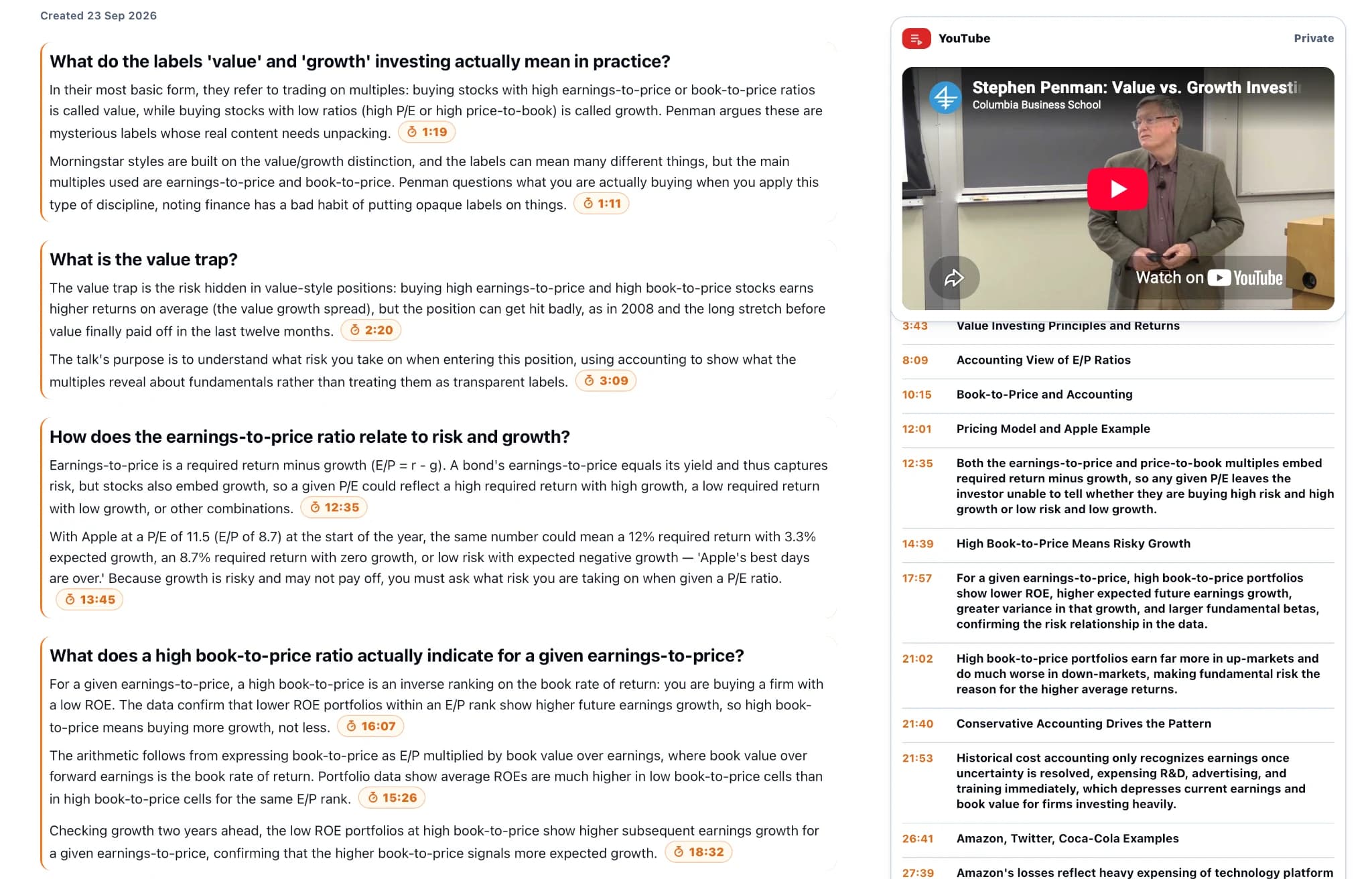
Step 1: Define what "done" looks like before you start
"Understand this lecture" isn't a goal you can check yourself against. Replace it with something specific enough to grade: "Explain the difference between correlation and causation, and identify the flaw in the lecturer's example," for instance.
Once you have that, ask for a map of the lecture built around it:
"List this lecture's main concepts in teaching order. For each one, give the lecturer's definition, one worked example, and a timestamp if available. Flag any explanation that depends on a diagram, equation, or on-screen demonstration."
Check the result against the video's actual chapter breaks. If the Q&A section or final application is missing from your notes, fix that gap before building study cards on top of it.
How to do this in KnowledgePilot: From the Home screen, click Create new analysis and paste the YouTube link, no download or transcript copying required. Select Key Takeaways as your output. That gives you the concept map with timestamps already attached, so you can spot-check it against the real chapter markers in a couple of minutes.
Step 2: Capture three kinds of notes, not one
Most people take one kind of note: definitions. That's necessary but not sufficient. A useful set covers three layers.
Definition notes answer "what does this term mean in this specific course." These stop vague familiarity from passing as understanding.
Application notes answer "how did the lecturer actually use this." A definition of a confidence interval is nearly useless on its own; the worked example and the assumptions behind it are what you'll be tested on.
Boundary notes answer "when does this stop applying." This is the layer people skip most often, and it's usually where exam questions live. For a programming lecture, that means recording the input, the expected output, and the edge case, not just the function's name.
How to do this in KnowledgePilot: Run the Custom Question output for each layer you want reinforced. For example: "What are the stated assumptions behind [concept], and under what conditions does the lecturer say it breaks down?" Because the answer is grounded in the actual video, you get the boundary condition the lecturer stated, not a generic textbook version of it.
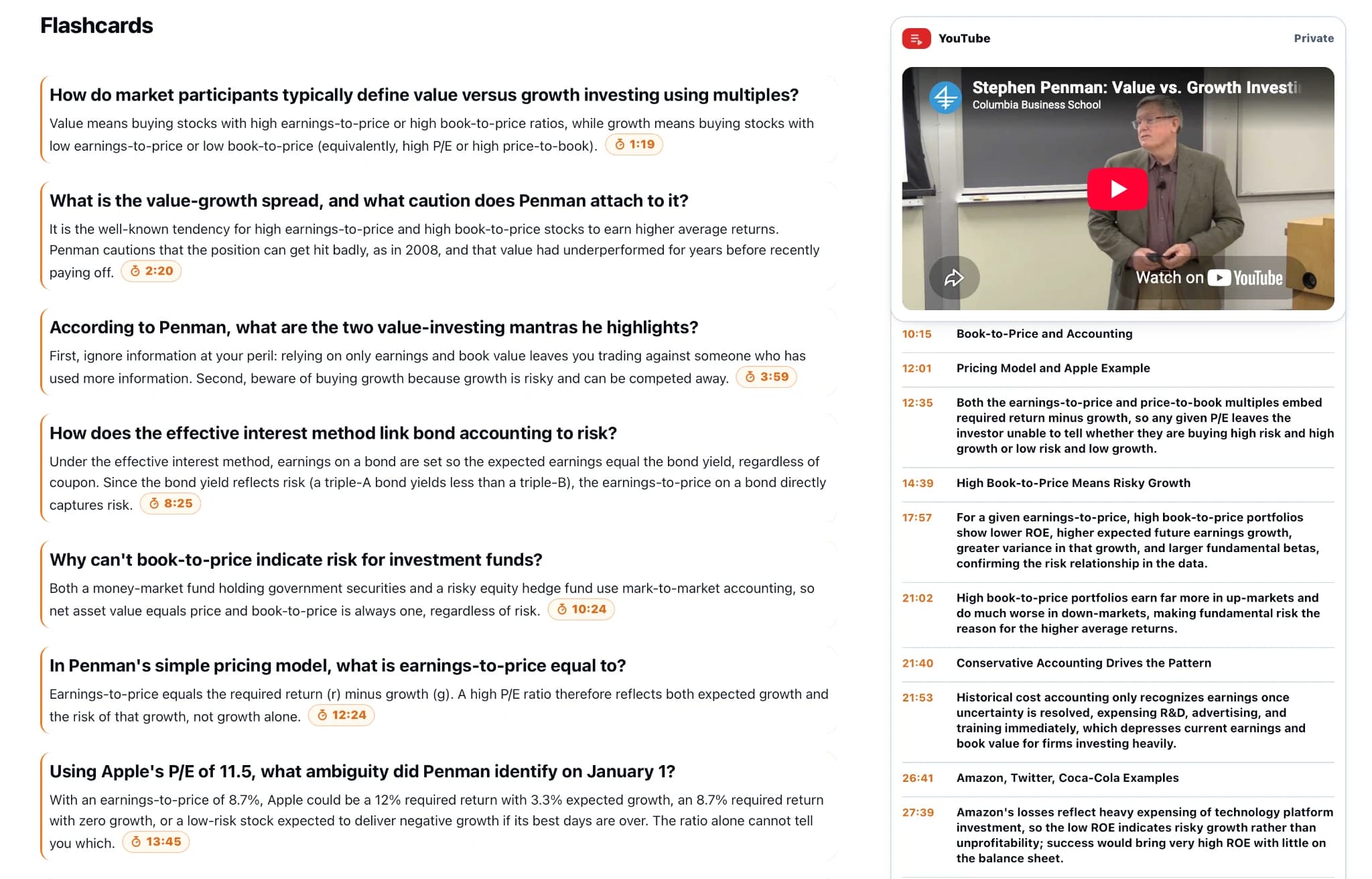
Step 3: Convert notes into questions, then actually answer them
Reading a summary feels like learning. Answering questions from memory is learning. Ask for both halves separately:
"Write five review questions from this lecture: two definition questions, two application questions, and one about a limitation. List the questions first, answers separately below. Include a source timestamp for each answer, and don't add anything not stated in the lecture."
Attempt every question before checking the answer. When you miss one, note why: forgotten definition, missed assumption, or inability to apply the method under new conditions. That classification tells you exactly which stretch of video is worth rewatching.
How to do this in KnowledgePilot: Select the Q&A Summary output alongside Key Takeaways in the same run, the dashboard shows the combined credit cost before you confirm. You'll get a ready-made question set with citations, so this step takes one extra click rather than a separate manual pass.
Step 4: Rewatch at the point of difficulty, not the whole lecture
A transcript that reads "move this term across" means nothing if the lecturer is simultaneously rearranging an equation on the board. Text-only summaries silently lose anything that lives only on screen: derivations, circuit diagrams, anatomy labels, software walkthroughs, physical technique demonstrations.
Treat the summary as a map to the parts worth rewatching, not a replacement for watching them. Mark the timestamp, go watch that segment, and reproduce the steps yourself rather than trusting a paraphrase.
How to do this in KnowledgePilot: Every output includes clickable timestamps back into the original video. When a note covers something visual, that link is what sends you to rewatch it instead of trusting the paraphrase, which is exactly the check this step calls for. You never have to scrub through the full lecture hunting for the right minute.
Step 5: Cross-check against the handout, if you have one
Lecture slides and spoken explanation often carry different information: the slide states the formal definition, the lecturer supplies the intuition, and sometimes the two don't fully agree because the slide is a simplification or an outdated version.
How to do this in KnowledgePilot: Upload the accompanying PDF as a second source and add both the video and the PDF to the same Knowledge Hub. Then run a Custom Question across the Hub:
"How does the lecturer's worked example relate to the definition in the handout? Identify what each source adds that the other doesn't."
KnowledgePilot answers from both sources and cites which one each part came from, so a slide/lecture mismatch surfaces immediately instead of getting smoothed over by a blended answer. If the two genuinely conflict, don't let the merged answer paper over it, check both originals yourself, especially if it could affect a graded question.
A practical end-of-session check
Close the generated notes and explain the central concept in your own words. Solve one relevant problem or describe one application. Then list the part you still cannot explain and save its timestamp. This gives the next session a starting point instead of another entire lecture to replay.
Continue with PDF Summarizer With Citations: How to Check the Evidence, compare the approach with How to Summarize Long YouTube Videos: A Practical AI Workflow, or explore YouTube Summary Tools With Timestamps: Which Workflow Fits?.
How we help
How KnowledgePilot helps
KnowledgePilot can generate study notes, Q&A and flashcards from a YouTube lecture, keep timestamps attached, and combine the video with a handout in a Hub so you can cross-check definitions and examples.

Frequently asked questions
Should I use a lecture summary before or after watching?
Before watching, use it as a map. After watching, use it to create questions and identify weak spots. For assessed methods and visual explanations, work through the original examples.
Can I turn a YouTube lecture into flashcards?
Yes, where the selected tool supports that output. Keep each card focused on one concept and check its answer against the lecture before studying from it.
What if the lecture and slides disagree?
Keep both statements with their sources and check the surrounding explanation. Seek clarification if the difference affects coursework; a generated synthesis should not decide which version the course expects.
Leave with a revision path
A useful study session ends with a few things you can explain and a few precise places to revisit. KnowledgePilot can help organise that path from a YouTube lecture, its supporting documents and your own questions.