Three Mindgrasp alternatives worth considering are KnowledgePilot for structured research from YouTube videos and documents, NotebookLM for a notebook of mixed sources, and NoteGPT for summaries alongside other learning and content tools. Choose around the source you have and the work you need to finish: understanding a chapter, reviewing a lecture or comparing explanations across several sources.
A useful comparison starts with one task you already do. Bring a familiar PDF or public lecture, ask the same question and inspect the supporting material before deciding whether to move your study routine.
Start with what you need to change
Mindgrasp's study tools cover notes, summaries, flashcards, quizzes and an AI tutor. Its site also describes lecture recording and several source formats. If those features already suit your course, identify what a replacement would improve before moving your material.
Perhaps a short summary is enough for weekly reading, but a research assignment needs a longer explanation and a route back to the evidence. Or your notes have outgrown a single lecture and you need to compare a handout with several videos. Write that requirement down; it gives you something concrete to evaluate.
Source compatibility comes first. KnowledgePilot accepts YouTube links and supported uploaded documents. If you need standalone audio or video uploads, live lecture recording or a particular integration, check the candidate's documented support before trying its outputs.
KnowledgePilot for focused video and document research
KnowledgePilot is a Mindgrasp alternative for turning a supplied video or document into selected analysis outputs. You can ask a focused question, generate study notes or other available outputs, then review the source references included with the result. The AI summarizer introduction explains the wider workspace.
For example, suppose you have a YouTube lecture on surface-water management and a PDF handout. Your assignment asks how the proposed approach affects runoff. An overview can orient you, but the useful answer needs the conditions attached to the recommendation and the passage that states them.
Start with one source and one question. Once both analyses are complete, group them in a Knowledge Hub if you need to ask where the lecture and handout agree or differ. Keep each source's explanation attributed separately.
NotebookLM for a notebook of mixed sources
NotebookLM is another alternative to Mindgrasp when your work starts with a collection of different materials. Google's source guide describes documents, Google Workspace files, web URLs, audio and public YouTube videos. The current help pages use the name Gemini Notebook.
Try it when you want to ask questions across a notebook of readings and supporting sources. Add the actual formats your course uses and ask a question that requires two named sources. Check that the answer preserves differences in terminology, dates or assumptions.
A broad source list does not settle which tool suits your study task. If your work mainly involves PDFs and YouTube, compare the output and source-review process as well. Our NotebookLM alternative guide develops that narrower video-and-document comparison.
Try one PDF and lecture task in KnowledgePilot
Use a document and public YouTube video you have permission to work with. In the document summarizer or YouTube summarizer, add the source and choose the available outputs that match your task. Review the estimate before starting generation.
For a first pass, ask: "Explain the main recommendation about runoff. Preserve its conditions and exceptions, and identify the supporting source locations. If the source does not answer part of the question, say what is missing."
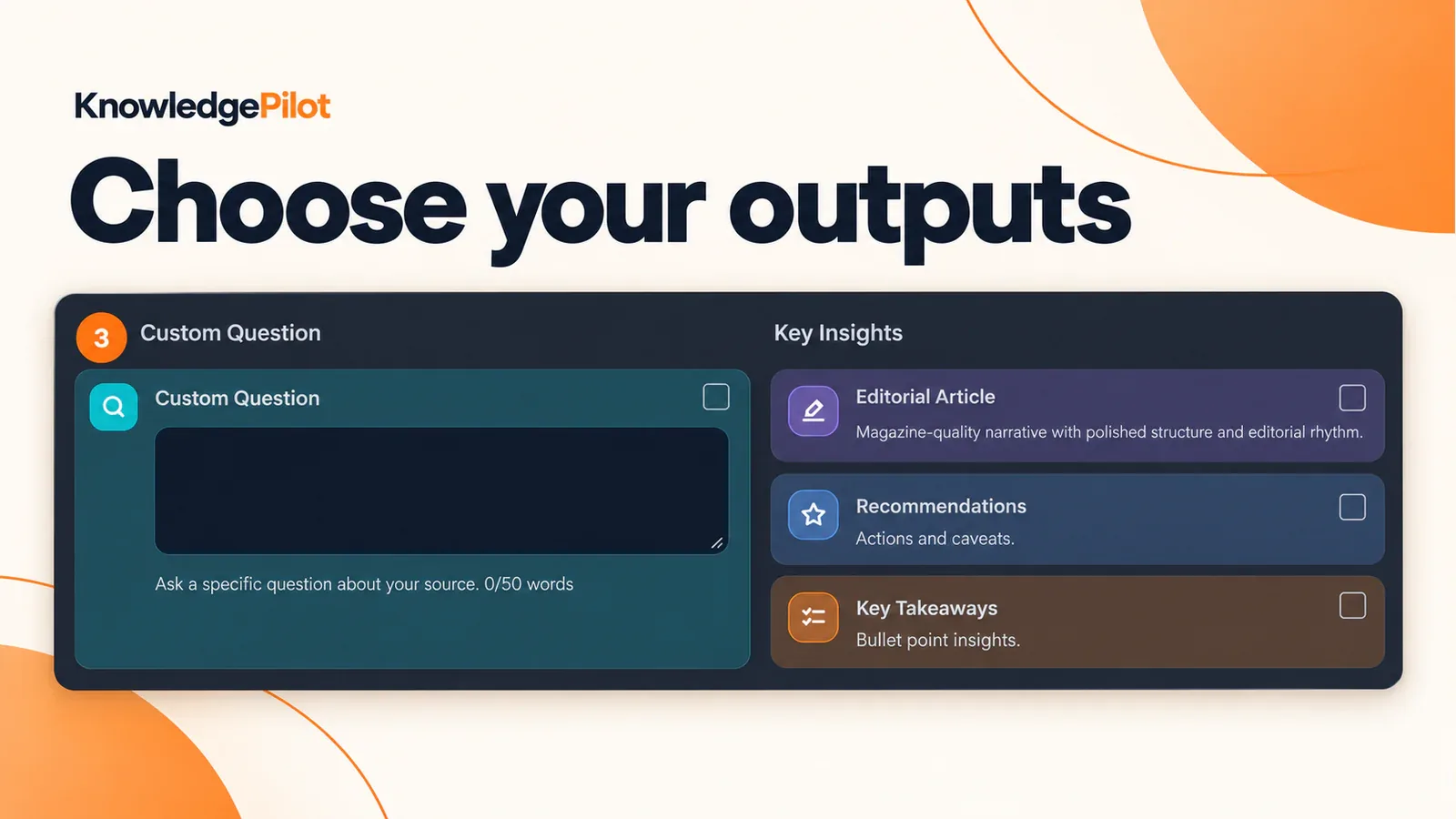
Choose an output and question that match the work you need to finish.
Treat the prompt as a starting point for your own material. A biology lecture may need a definition and worked example; a history reading may need the author's argument and evidence. Keep the question small enough that you can review the answer against the source.
Check the conditions in the supporting passage
In the document illustration below, the highlighted passage says to maintain specified water-flow and runoff conditions unless an approved management strategy establishes otherwise. Notes that say only "maintain current runoff" lose an exception that affects how the statement should be used.
Follow an available document reference and read the surrounding passage. For a video, open the linked moment and listen to the complete explanation. A reference helps you find evidence; you still need to decide whether that evidence supports the answer.
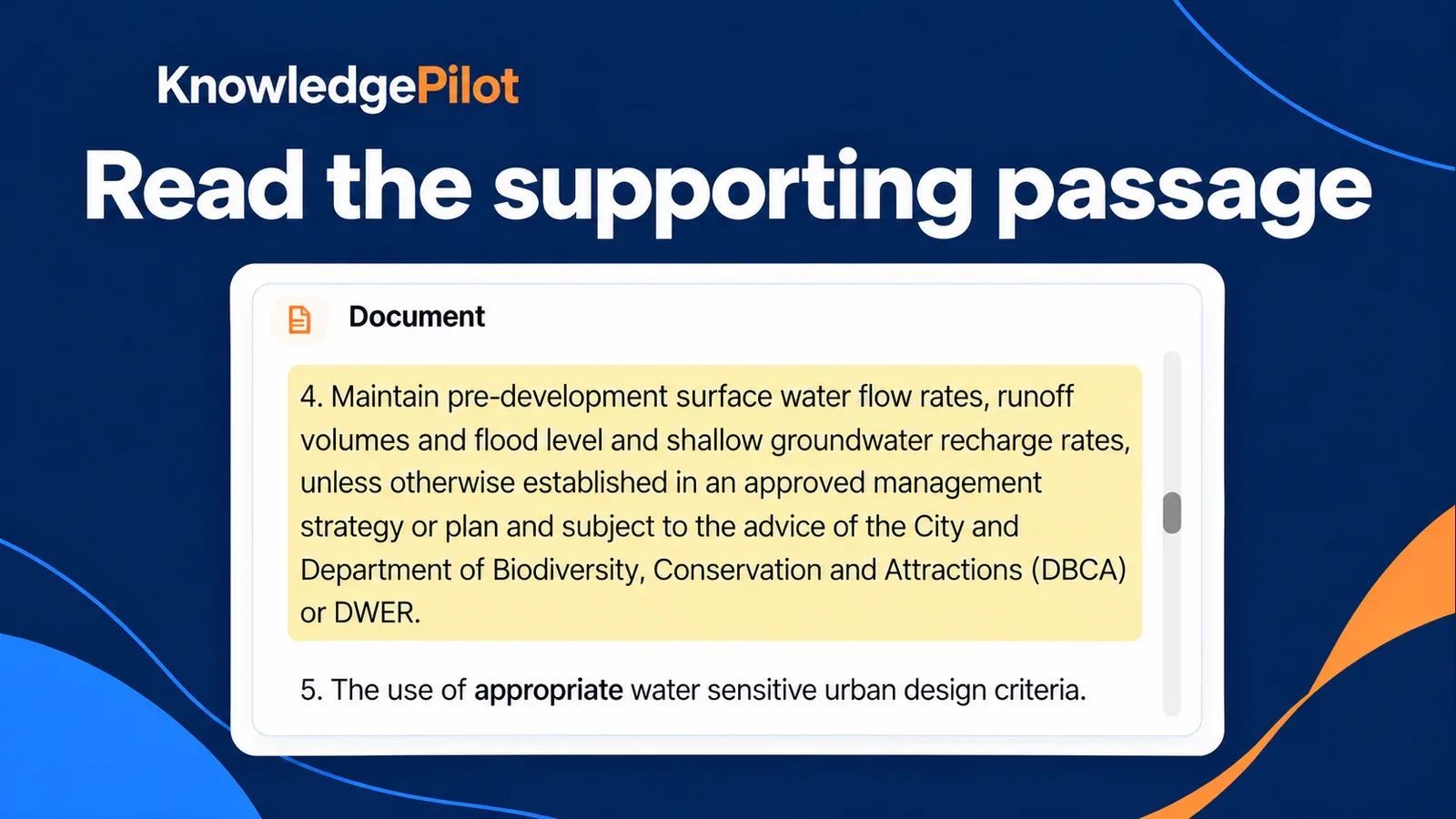
Read the conditions and exceptions around the statement you plan to reuse.
Short Summary is citation-free. Choose a citation-bearing output when source review matters, and keep your own page or passage notes where needed. For a diagram or worked calculation, inspect the original visual too; text notes may omit information it carries.
Compare the results before moving your study routine
Keep a short record of the task, the source, the output you requested and anything you had to fix. Separate an unsupported input format from an answer that needs revision; those problems affect your choice differently.
Check whether each result answers the question, preserves the important qualifications and gives you enough detail for the next step. Then return to the saved work and try one follow-up question. A usable first summary and a usable research session are different acceptance checks.
For chapter reading, our guides to summarising a book and writing a chapter summary explain how to keep the scope fixed while shortening the material.
Which Mindgrasp alternative should I try for PDFs and YouTube?
Try KnowledgePilot for selected analysis outputs and focused source questions, NotebookLM for a notebook of mixed materials, or NoteGPT for summaries and related content tasks. Compare them using the same familiar source and the result you actually need.
Can KnowledgePilot replace Mindgrasp for recorded lectures?
KnowledgePilot accepts supported YouTube links and uploaded documents. It does not accept standalone recording files or record a live lecture. If those are essential to your routine, choose a tool that documents the required recording workflow.
How should I compare free access or paid plans?
Check the provider's current allowance against a complete study session: source length, processing, selected outputs, follow-up questions and downloads. A free starting allowance does not establish that your normal weekly workload will fit.
Choose around your next assignment
Start with the material already on your reading list. Generate the notes or focused answer you need, check one difficult claim and return to the work for a follow-up question. Those steps will tell you more about a Mindgrasp alternative's fit than a long list of features.