Four NotebookLM alternatives to consider are Mindgrasp for coursework, NoteGPT for learning conversions, Recall for a saved-content knowledge base, and KnowledgePilot for structured video and document analysis. Start with the task you need to improve: importing a recording, finding saved material, producing a brief, or checking an answer against its source.
Explore KnowledgePilot's supported document formats and source references
This guide compares official product documentation checked on 13 October 2026, linked below. It is not a hands-on benchmark. KnowledgePilot is our product, and the recommendations are editorial assessments of workflow fit.
First, decide what you would miss
Google's source documentation covers a broad mix of documents, web sources, audio and public captioned YouTube videos. The documentation currently uses the name Gemini Notebook. We retain “NotebookLM alternatives” here for readers searching for the familiar product name.
Before switching, list your three essential tasks. If importing Google Workspace material is central, test that part of a replacement. If you mainly ask focused questions about PDFs and YouTube videos, a narrower source workflow may be enough.
Be specific about the point of friction. Is adding a source awkward, is the output too general, or is it hard to return to a verified answer next week? Those are different problems. Keep NotebookLM if its mixed-source notebook already solves the one you care about.
Alternatives at a glance
| Option | Main reason to consider it | Check before switching |
|---|---|---|
| Mindgrasp | Coursework and study materials across several input types | Required formats and study-output allowances |
| NoteGPT | A broad collection of summarisation and learning tools | Quota use across the tasks you need |
| Recall | A connected collection of saved reading and viewing | Capture, organisation and retrieval for your sources |
| KnowledgePilot | Structured analysis of YouTube links and documents | Desired outputs, source citations and Hub limits |
Which alternative fits your next task?
| Task | Candidate to evaluate | A concrete acceptance check |
|---|---|---|
| Turn a recorded lecture into revision material | Mindgrasp | Import your recording and check one definition and worked example |
| Convert an individual source into learning material | NoteGPT | Create the output you need and check the quota consumed |
| Find and connect material saved over time | Recall | Retrieve an older item using a question you would naturally ask |
| Produce a research brief from a PDF or YouTube video | KnowledgePilot | Create the chosen output and open the supporting passage or timestamp |
For PDFs, use the source-checking checklist for PDF summaries. For video research, use the five-step workflow for long YouTube videos. Keep the same question and source when comparing tools that accept that source.
No option should win every row in a comparison. A broader input list is useful only when it includes material you actually use; a specialised workflow is useful only if it helps you finish the task.
Google's current help page documents audio files, Google Workspace files, PDFs, web URLs and public YouTube videos with captions. That is a materially broader import list than KnowledgePilot's YouTube-link-and-document workflow. If local recordings or direct Workspace sync are non-negotiable, check those requirements before testing output quality.
Choose Mindgrasp when the course material comes in many forms
Mindgrasp documents notes, summaries, quizzes and flashcards from coursework, including documents and recordings. It is worth considering when the study process begins before a lecture exists as a public YouTube link or complete PDF.
For your own evaluation, use a definition, a worked example and an exception from a familiar lecture. Check the resulting study material against all three. Do not assume a quiz is correct merely because it is presented confidently.
Choose NoteGPT for a collection of quick learning tools
NoteGPT brings together YouTube and document summarisation with other learning and creation tasks. It may fit someone who wants several small conversions from the same piece of material.
Look at your weekly workload rather than the headline subscription price: how many sources, how long they are, and how many outputs you need. Check the current quotas before committing to a plan.
Choose Recall when collection and retrieval are the main problem
Recall presents a knowledge-base workflow for saved content. This makes it a candidate when your frustration is remembering what you saved and connecting ideas across a reading collection.
Try to retrieve an older item using the kind of question you would naturally ask. Successful capture is only half the job; you also need to find the useful material again.
Choose KnowledgePilot when you need a reusable analysis
KnowledgePilot centres the workflow on a YouTube link or document, selected outputs and optional analysis frameworks. Use it when your next step is a research brief, study notes, risk review or focused answer with available source references.
Related sources can be grouped in Hubs, and retained source material can support new outputs later. This is useful when your question changes: a video analysed for project risks today may be useful for a training note next week. Retention rules still apply; it is not a promise of permanent storage.
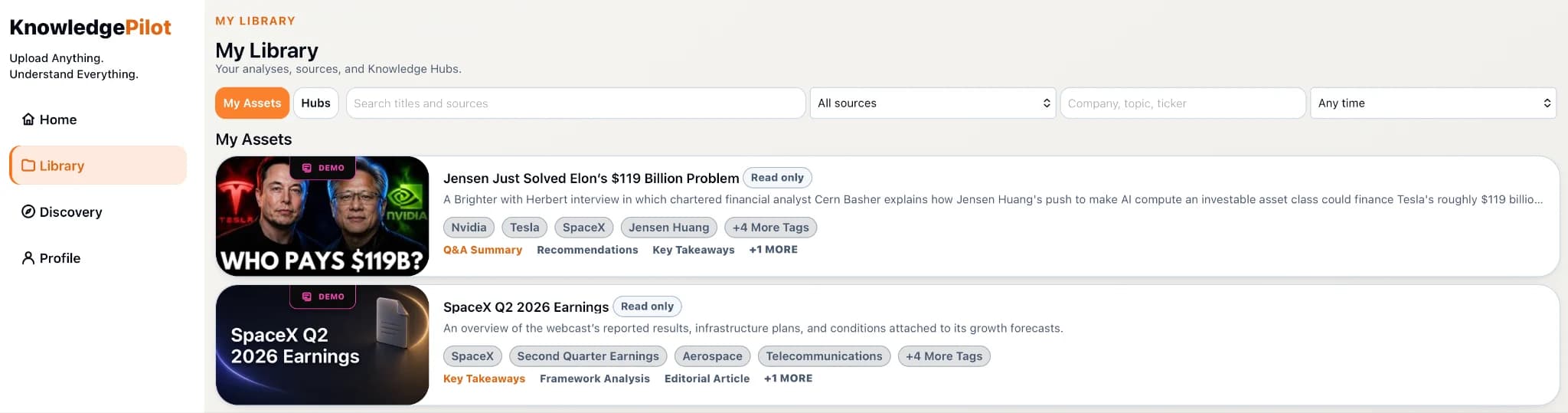
For a concrete trial, import one document, create a brief with the selected outputs, and follow a material answer to its supporting passage. Return the next day and ask a different question about the same source. That checks the complete workflow—analysis, verification and reuse—rather than only the first summary.
Try a small migration before moving the collection
Bring one familiar PDF and one public video into your shortlist. Ask the same question in each supported workflow: “What does the source establish, what remains uncertain, and where can I verify both?”
Then try the next-day task: reopen the source, find the answer and ask a different question. This reveals whether the product fits ongoing research, rather than just making a good first impression.
Keep a simple scorecard: source accepted, answer useful, reference checkable, saved work findable, and limits acceptable for your workload. Mark an item “not tested” if you cannot verify it. Do not turn a vendor's feature description into a personal performance result.
Continue with The Honest Guide to NoteGPT Alternatives, compare the approach with YouTube Summary Tools With Timestamps: Which Workflow Fits?, or explore How to Summarize an Annual Report With AI: An Evidence-First Guide.
How we help
How KnowledgePilot helps
KnowledgePilot focuses on structured analysis of YouTube links and supported documents. Choose outputs, inspect available source references, and revisit retained material in a Hub; compare its narrower source coverage against the imports your own workflow needs.
For a PDF and lecture study task, compare our Mindgrasp alternatives for PDFs, YouTube and study notes.
Explore KnowledgePilot Knowledge Hub for questions across videos and documents to see how related sources fit into the research workflow.
For a focused product comparison, read KnowledgePilot as a NotebookLM alternative for video and PDF research.

Frequently asked questions
Do I need to replace NotebookLM to get source-based answers?
No. Start with the feature or workflow you need to improve. Changing products makes sense when a specific alternative serves that task better for you.
Does KnowledgePilot accept the same source types?
No. It supports YouTube links and PDF, DOCX, TXT, RTF, MOBI and EPUB documents. It does not accept standalone audio or video uploads.
What should I compare besides price?
Compare the actual source formats, useful outputs, source verification, retrieval, retention and expected workload. A cheaper plan is not better value if it cannot handle your required task.
Replace a friction point, not just a brand
Choose the workflow that makes your next research or study session easier. If your priority is turning PDFs and YouTube videos into reviewable analysis, KnowledgePilot is a focused option to try.